Showing posts with label CN900 Mini. Show all posts

Thursday, 23 May 2019

TJECU CN900 Mini fw 1.50.2.23 sw V3.1 Update Procedure

CN900 Mini sw V3.1 free download on mega (No password), CN900 Mini fw 1.50.2.23 update info and how to update from 1.50.2.15.

CN900 Mini sw V3.1 free download on mega (No pass)
https://mega.nz/#!HsdkxALL!jo8zlrHlWG_2uOrtikAw1lFGtmnvzS5ecjQhFTeZrYs 

CN900 Mini V1.50.2.23 update Info:
ADD:
Detect Hitag AES(7A), 88
CN5, CN5-new to copy 4C, 4D or 64 and to generate.
Toyota 8A Smart key Type differentiation

Improve:
3A, 88, 8E and 8A information show.

How does CN900 Mini V1.50.2.23 update from 1.50.2.15?
Device driver software was not successfully installed.
tjecu-cn900-mini-fw-1.50.2.23-sw-v3.1-update-01


Open the "Mini USB Driver" Folder, select "Win7", then open "dpinst_x86", then complete the Device Driver Installation Wizard.
tjecu-cn900-mini-fw-1.50.2.23-sw-v3.1-update-02

tjecu-cn900-mini-fw-1.50.2.23-sw-v3.1-update-03


Click on "My Computer", then "Computer Management", then "Device Manager" to check if the driver is ready.
tjecu-cn900-mini-fw-1.50.2.23-sw-v3.1-update-04


Open "CN900 -Mini V31" on the desktop, click on "Connect".
It pops up a message " New Firmware Found, Version 1.50.2.3", click on " Update".
tjecu-cn900-mini-fw-1.50.2.23-sw-v3.1-update-05

tjecu-cn900-mini-fw-1.50.2.23-sw-v3.1-update-06


Update from Step 1 to Step 4.
tjecu-cn900-mini-fw-1.50.2.23-sw-v3.1-update-07

tjecu-cn900-mini-fw-1.50.2.23-sw-v3.1-update-08

tjecu-cn900-mini-fw-1.50.2.23-sw-v3.1-update-09


Being completed, wait please...
tjecu-cn900-mini-fw-1.50.2.23-sw-v3.1-update-10

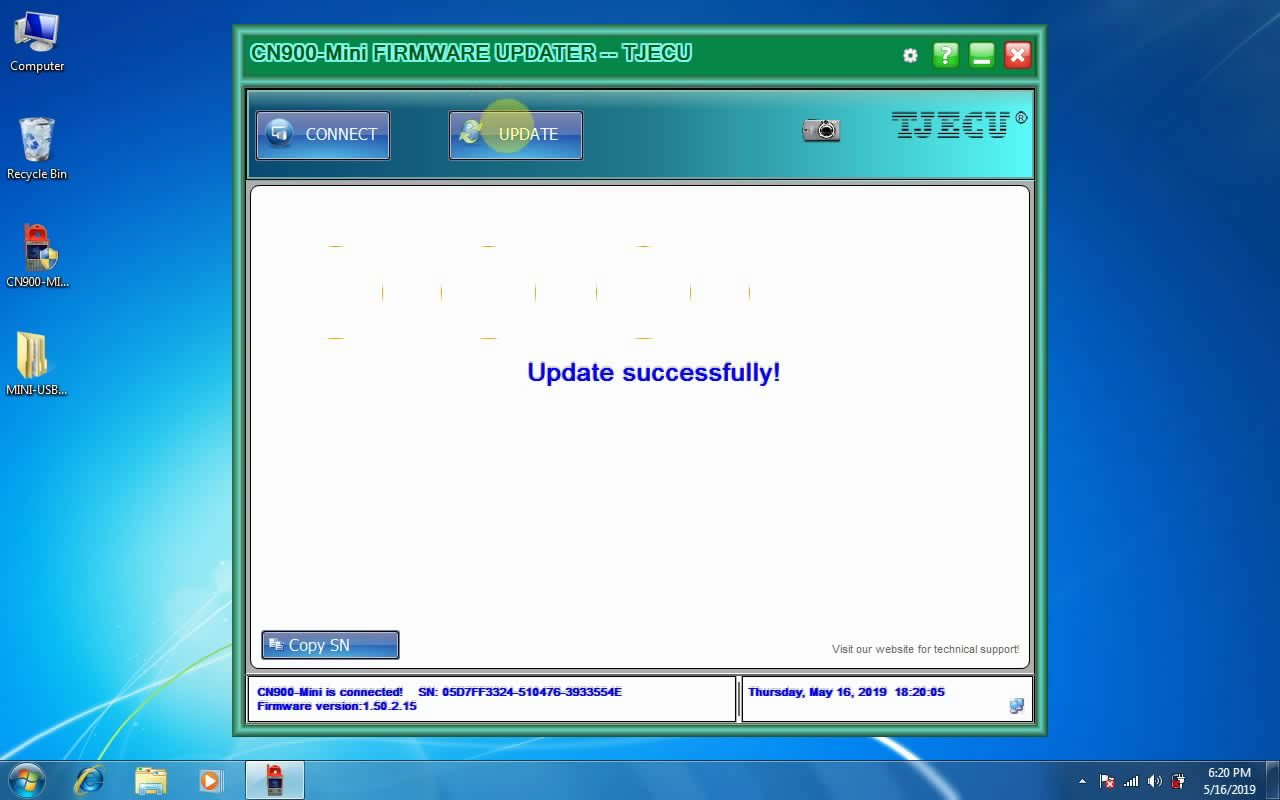
Update successfully.
tjecu-cn900-mini-fw-1.50.2.23-sw-v3.1-update-11


One more time, click on "CN900 -Mini V31" on the desktop.
Click on "Connect", you can see it shows the CN900-Mini is connected, SN:...., firmware version: 1.50.2.23.
tjecu-cn900-mini-fw-1.50.2.23-sw-v3.1-update-12

Click on "Update" and get the message "The firmware is latest, No need to update.".
tjecu-cn900-mini-fw-1.50.2.23-sw-v3.1-update-13


TJECU CN900 Mini fw 1.50.2.23 sw V3.1 Update job is done.

Video guides:
http://blog.obd2shop.co.uk/tjecu-cn900-mini-fw-1-50-2-23-sw-v3-1-update-procedure/

Thursday, 26 April 2018

How to use JMD ND900 mini / CN900 Mini read out the 12 digits code of Hyundai Kia (46 smart chip)?

Here is for you information: read out the 12 digits code of Hyundai Kia (46 smart chip) by using JMD ND900 mini and CN900 Mini.

Mini900 / CN900 mini reads out the 12 digits code for the following 2 types of models:
a. the model with card slot;
b. the model with one-key start.

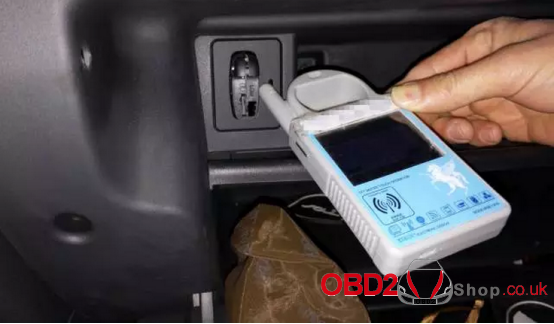
1) Procedure on how to read the 12 digits code on the model with card slot (shown as picture I):
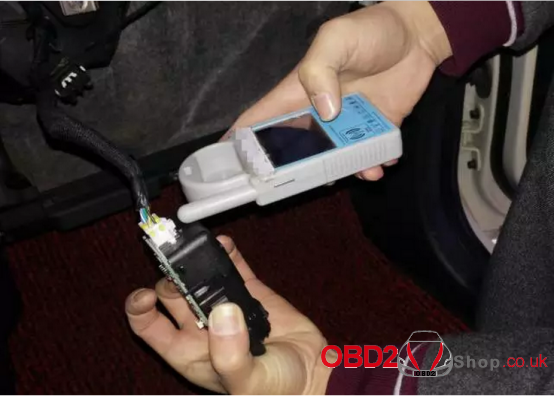
Remove the card slot shell first (shown as picture II), because MINI900 cannot receive the vehicle signal directly for the limitation of card slot design. If the first time failed, please repeat for several times.

JMD ND900 mini read the 12 digits code on the model with card slot
picture I

Remove the card slot shell
picture II
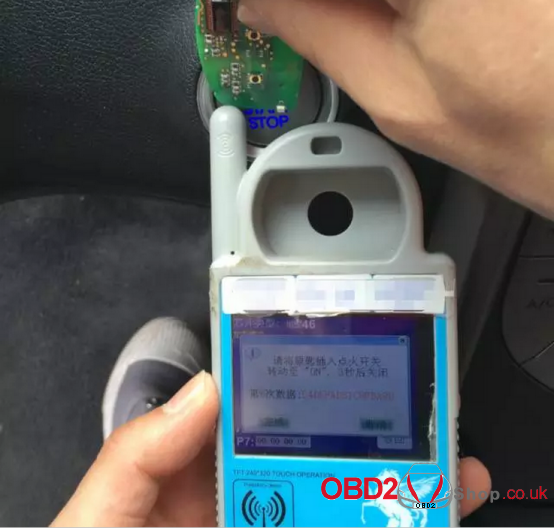
2). Procedure on how to read out the 12 digits code on the model with one-key start:
Directly read the 12 digits code with the MINI900 device put close to the start button. Shown as below.

read out the 12 digits code on the model with one-key start

Notice: When reading 12 digits code of the smart card, please remove the battery and then operate as above.

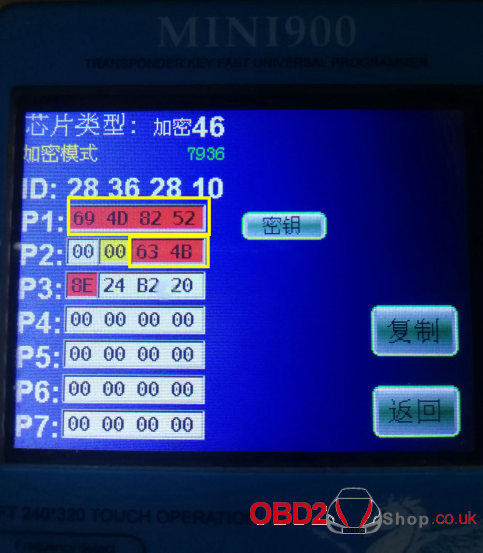
Finally, the 12 digits code is read out and display on the screen, the last two digits in the P2 row + all digits in the P1 row are the 12digits code, that is 63 4B 69 4D 82 52. Shown as below.


You may interest in:

EoneBoss ET Series 4A Bluetooth Smart Keys – New Product Launch

EoneBoss has officially launched its new ET Series 4A Bluetooth Smart Keys, designed for vehicles using 4A (AA, BA) key chips. The new ET Se...